Lighthouse 3.0 introduces a new task manager that makes setting up and managing scheduled tasks for a website easier and more flexible.
The way it works is that Lighthouse automatically creates a master task in the ColdFusion administrator that runs every 5 minutes. Whenever this master task runs, it looks for tasks in Lighthouse that are due to run and runs them. One advantage of this is that no matter how many tasks are set up for a site, there is only one entry in the ColdFusion admin -- which makes managing multiple sites on the same server easier. More importantly, it allows for more flexible and robust scheduling options than would otherwise be available.
The Lighthouse Task Manager is relatively simple. Here is the screen to add a task:
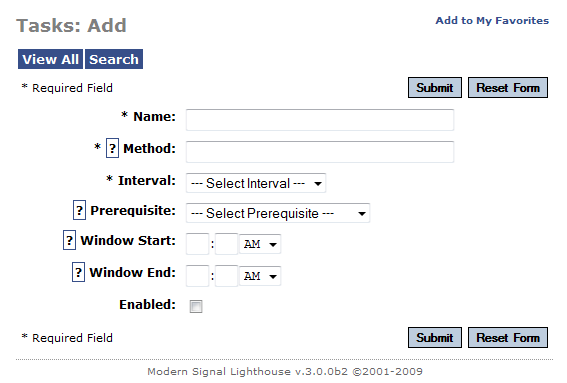
Rather than set a url for the task, you must provide a cfc method to run for the task. So you need to put your task code in a CFC method, and you would then specify the method as "cfc.MyCFC.MyMethod".
You can then specify the interval for the method, any prerequisites (other daily tasks that must be run before the current task is run), and the window of time during which the task should be run.
Most of these options are available in the ColdFusion task manager, but the option to set a prerequisite for a task is an important addition. This allows you to set up any number of tasks to run at a particular time in the morning, and ensure that they will all run in the correct order, and also ensure that if a task fails, other tasks that depend on it are not run.
The task manager also keeps a log of every time a task is run. The task method should return a string, which will be logged. If the task produces an error, the task run will be recorded as unsuccessful, and the error message will be logged. To log custom error messages, you will want to catch any errors and throw a custom error with the appropriate message.
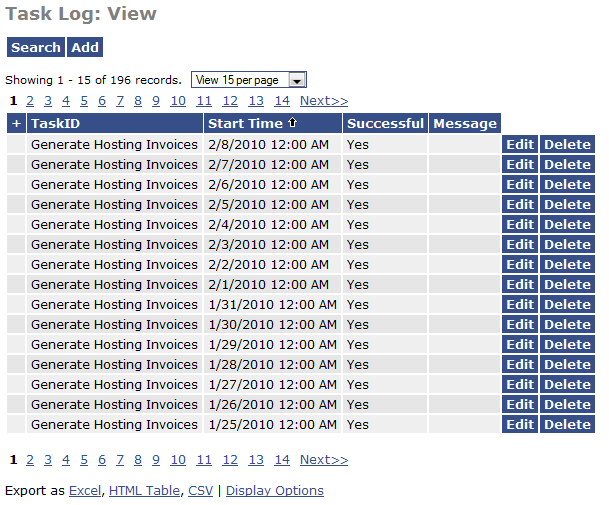
The task manager is pretty new at this point, and hasn't gone through any trials by fire yet, but I'll be interested to see how it is used as more sites adopt Lighthouse 3.0.
Posted on February 8, 2010 3:13:49 PM EST by David Hammond

Posted on January 20, 2016 3:46:25 PM EST by hugo
Comments have been disabled for this page.